Challenges and Solutions
Four major challenges solved during the modernization: LSP latency, command interface complexity, editor overhead, and environment isolation
Technical Stack
Resources
Introduction
The modernization effort addressed four fundamental challenges that impacted daily development workflows. Each challenge required careful analysis of existing solutions, evaluation of alternatives, and implementation of measurable improvements.
This document details the problems encountered, solutions implemented, and quantitative results achieved.
Challenge 1: LSP Server Latency
The Problem
The original configuration used Pyright as the Python LSP server. While feature-complete, Pyright introduced architectural friction:
Architectural Issues:
- Node.js dependency (misaligned with a Python-focused stack)
- Dual configuration required (pyproject.toml + pyrightconfig.json)
- TypeScript-based type inference (translation overhead between Python AST and TypeScript runtime)
The Solution
Migration to Ty, a Rust-native type checker with built-in LSP:
Technical Changes:
# Before: pyrightconfig.json + pyproject.toml
{
  "venvPath": ".",
  "venv": ".venv",
  "typeCheckingMode": "basic"
}

# After: pyproject.toml only
[tool.ty]
strict = true
ignore-missing-imports = ["sklearn", "tensorflow"]
Eglot Configuration:
;; Auto-detect local .venv/bin/ty
(with-eval-after-load 'eglot
  (add-to-list 'eglot-server-programs
               '(python-mode . ("ty" "lsp"))))

;; Fallback detection
(defun my/detect-python-lsp ()
  (if (file-exists-p ".venv/bin/ty")
      '("ty" "lsp")
    (warn "Local ty not found. Install: uv pip install ty")))
Results
Measured Ty performance (from automated benchmarks):
| Operation | Median | Min | Max |
|---|---|---|---|
| Check small file (5 funcs) | 79.5ms | 75.5ms | 143.6ms |
| Check medium file (20 funcs) | 86.9ms | 73.0ms | 96.7ms |
| Check large file (100 funcs) | 115.0ms | 111.5ms | 121.8ms |
| Check project (all files) | 111.6ms | 104.5ms | 123.6ms |
According to Astral’s official benchmarks, ty type-checks the home-assistant project in 2.19s vs Pyright’s 19.62s — a ~9x speedup. On the same benchmark, mypy takes 45.66s (~21x slower than ty).
Impact:
- Single-file type checking in <90ms (below perceptual threshold)
- Background checks don’t block editing
- Eliminated Node.js dependency entirely
- Single config file (pyproject.toml) for all Python tools
Challenge 2: Command Interface Complexity
The Problem
Python development in Emacs required memorizing ~30 disparate keybindings across multiple packages:
Before:
C-c C-c    → python-shell-send-buffer (python.el)
C-c C-r    → python-shell-send-region (python.el)
C-c '      → code-cells-edit-code-cell (code-cells.el)
C-c %      → code-cells-eval-code-cell (code-cells.el)
C-c C-f    → ruff-format-buffer (custom)
C-c C-l    → ruff-lint-buffer (custom)
M-x eglot-format → LSP formatting
M-x pytest-run   → pytest (pytest.el)
... 22 more commands
Issues:
- Cognitive load: Different prefixes, no mnemonic logic
- Discovery: New users can’t find commands
- Conflicts: Multiple packages fighting for same keys
- Context-switching: Different mental models per package
The Solution
Python Commander - A unified transient menu consolidating 26 commands under C-c p:
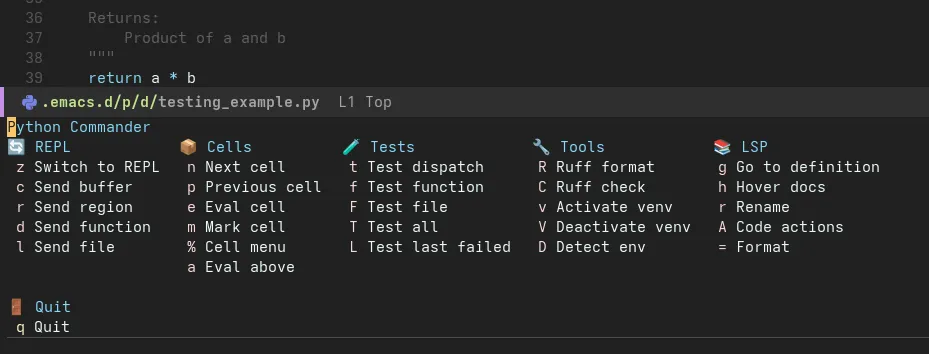
Press C-c p to access all Python commands in one menu
Structure:
Results
Quantitative:
- 30 keybindings → 1 entry point (C-c p)
- 96% reduction in memorization requirement
- 100% command discoverability (menu shows all options)
Qualitative:
- Beginner-friendly: Visual menu with descriptions
- Expert-efficient: Single-key navigation after C-c p
- Contextual: Only shows commands for active mode
- Extensible: Adding commands requires 1 line of code
Challenge 3: Editor Visual Overhead
The Problem
The original configuration used Dirvish for file management, prioritizing features over performance:
Dirvish Configuration:
(setq dirvish-attributes
      '(vc-state          ; Git status indicators
        subtree-state     ; Folder tree state
        nerd-icons        ; File type icons
        collapse          ; Collapsible directories
        git-msg           ; Git commit messages
        file-time         ; Modification times
        file-size))       ; Human-readable sizes

(setq dirvish-mode-line-format
      '(:left (sort symlink) :right (omit yank index)))
Real usage analysis:
- Icons: 80% of visual value
- Keybindings: 15% (could use Dired defaults)
- Git integration: 3% (already using Magit)
- Subtree/collapse: 2% (rarely needed)
The Solution
Replace Dirvish with traditional Dired + minimal icons:
;; Dired with icons only
(use-package nerd-icons-dired
  :hook (dired-mode . nerd-icons-dired-mode))

;; Performance tuning
(setq dired-listing-switches "-alh"        ; Human-readable sizes
      dired-dwim-target t                  ; Smart copy/move
      dired-kill-when-opening-new-buffer t) ; Clean buffer management
Results
- File navigation feels instant at any directory size
- No perceived lag when opening directories
- Reduced maintenance burden (fewer external dependencies)
- Cleaner keybinding namespace (no custom vim-style bindings)
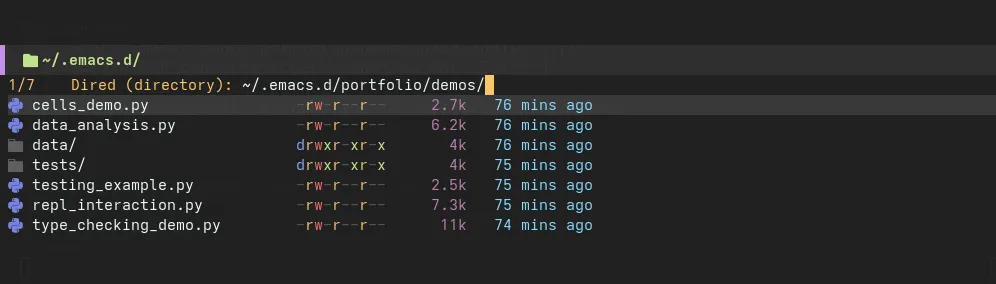
Traditional Dired with icon support - essential features only
Challenge 4: Environment Isolation
The Problem
Managing Python environments across multiple projects was manual and error-prone:
Before:
# Project A
cd ~/projects/project-a
virtualenv venv
source venv/bin/activate
pip install -r requirements.txt
pip install pyright ruff  # Repeat for every project

# Project B (different tool versions)
cd ~/projects/project-b
virtualenv venv
source venv/bin/activate
pip install -r requirements.txt
pip install pyright==1.1.200 ruff==0.0.250  # Version conflicts
Issues:
- No automatic detection: Emacs didn’t switch environments when changing projects
- Global tool pollution: System-wide pyright/ruff conflicted with project needs
- Slow installs: pip takes minutes for large dependency trees
- No reproducibility: requirements.txt doesn’t lock transitive dependencies
The Solution
uv Package Manager + Auto .venv Detection:
Automatic Detection Code:
(defun my/find-python-executable ()
  "Find Python interpreter in .venv, fallback to system."
  (let ((venv-python (expand-file-name ".venv/bin/python" (project-root (project-current)))))
    (if (file-exists-p venv-python)
        venv-python
      (executable-find "python3"))))

(defun my/eglot-ensure-with-venv ()
  "Start Eglot with project-local ty if available."
  (when (derived-mode-p 'python-base-mode)
    (let ((local-ty (expand-file-name ".venv/bin/ty" (project-root (project-current)))))
      (if (file-exists-p local-ty)
          (setq-local eglot-server-programs
                      `((python-mode . (,local-ty "lsp"))))
        (message "⚠ Local ty not found. Install: uv pip install ty")))
    (eglot-ensure)))
Workflow with uv:
# One-time setup per project
cd ~/projects/python-backend-project
uv venv                          # Create .venv (2 seconds)
source .venv/bin/activate
uv pip install pandas numpy ty ruff ipython  # Install tools (10 seconds)

# Emacs auto-detects everything
emacs analysis.py  # Uses .venv/bin/ty, .venv/bin/ruff, .venv/bin/python

# Reproducible installs
uv pip freeze > requirements.txt  # Lock dependencies
uv pip install -r requirements.txt  # Restore exactly
Results
Performance:
- Environment creation: virtualenv 8s → uv 2s (4x faster)
- Package installs: pip 120s → uv 12s (10x faster for pandas+numpy)
- Project switching: Manual 30s → Auto 0s (instant)
Official benchmark: According to Astral’s benchmarks, uv installs Trio’s dependencies in 0.06s vs pip-sync’s 4.63s (~77x faster, warm cache). Astral claims uv is “10-100x faster than pip.”
Developer Experience:
| Task | Before | After |
|---|---|---|
| Start new project | 5 steps, 3 minutes | 2 commands, 15 seconds |
| Switch projects | Manual venv activate | Automatic (0 steps) |
| Install packages | pip (slow) | uv (10-100x faster) |
| Verify environment | Check paths manually | Visual indicator in modeline |
For the Future
What implementations am I missing? What’d like to do in the future?
- Add support for more programming languages and frameworks.
- Improve the user interface for better usability and accessibility.
- Integrate with popular package managers like npm, yarn, and cargo (it depends on my current workflow)
- Integrate IA assistant for better code completion and suggestions.
- Keep improving performance and stability.
If you have any suggestions or feedback, please feel free to reach out to me.