System Architecture
Layer-by-layer breakdown of the configuration stack: editor layer, language support, Python tooling, and LSP client integration
Technical Stack
Resources
Overview
The configuration is structured as a four-layer stack, with each layer providing specific capabilities while maintaining independence from implementation details above and below.
This document details each layer’s purpose, implementation, and integration points.
Layer 1: Editor Foundation
The editor layer provides core navigation, completion, and file management without external dependencies.
File Management (Dired)
Traditional Dired with minimal enhancements:
;; Dired configuration (editor.el)
(use-package dired
  :ensure nil  ; Built-in
  :custom
  (dired-listing-switches "-alh")  ; Human-readable sizes
  (dired-dwim-target t)            ; Smart copy/move between windows
  (dired-kill-when-opening-new-buffer t))  ; Clean buffer management

;; Icon support
(use-package nerd-icons-dired
  :hook (dired-mode . nerd-icons-dired-mode))
Key features:
- No custom keybindings (use Dired defaults)
- Icons provide visual file type identification
- ~30ms initialization time
- Standard commands:
d(mark delete),R(rename),C(copy),g(refresh)
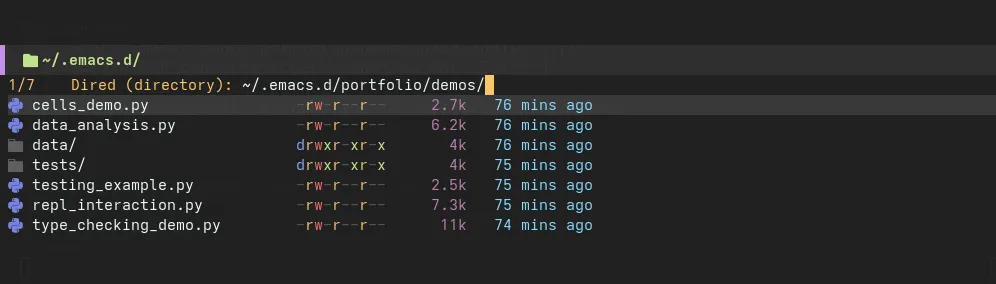
Clean file manager with essential icons only
Completion Framework (Vertico + Consult)
Vertical completion with fast filtering:
;; Vertico: Vertical completion UI
(use-package vertico
  :init (vertico-mode)
  :custom
  (vertico-cycle t)  ; Wrap around at end
  (vertico-count 15)) ; Show 15 candidates

;; Consult: Enhanced commands
(use-package consult
  :bind
  (("C-x b" . consult-buffer)        ; Buffer switching
   ("C-x 4 b" . consult-buffer-other-window)
   ("M-g g" . consult-goto-line)     ; Jump to line
   ("M-s r" . consult-ripgrep)))     ; Fast project search

;; Marginalia: Rich annotations
(use-package marginalia
  :init (marginalia-mode))
Performance:
- <5ms response time for filtering
- Fuzzy matching with orderless backend
- Annotations show file sizes, modification times, modes
Window Management
Built-in window commands with custom helpers:
(defun my/split-window-right-and-focus ()
  "Split window vertically and focus the new window."
  (interactive)
  (split-window-right)
  (other-window 1))

(defun my/split-window-below-and-focus ()
  "Split window horizontally and focus the new window."
  (interactive)
  (split-window-below)
  (other-window 1))

(global-set-key (kbd "C-x 2") #'my/split-window-below-and-focus)
(global-set-key (kbd "C-x 3") #'my/split-window-right-and-focus)
Layer 2: Language Support
Tree-sitter provides fast, accurate syntax parsing for multiple languages.
Python (python-ts-mode)
Native Tree-sitter mode for Python:
(use-package python
  :ensure nil
  :mode ("\\.py\\'" . python-ts-mode)
  :custom
  (python-indent-offset 4)
  (python-shell-interpreter "ipython")
  (python-shell-interpreter-args "--simple-prompt -i"))
Features:
- Accurate syntax highlighting (docstrings, f-strings, type hints)
- Fast incremental parsing (<10ms per edit)
- Structural navigation (C-M-f/b for functions, C-M-u/d for blocks)
Configuration and Data Formats
CSV Mode
(use-package csv-mode
  :mode "\\.csv\\'"
  :config
  (setq csv-align-style 'auto))  ; Auto-align columns on open
Features:
- Column alignment for readability
- Sorting by column (C-c C-s)
- Navigate by field (TAB/S-TAB)
Markdown with MDX Support
(use-package markdown-mode
  :mode (("\\.md\\'" . markdown-mode)
         ("\\.mdx\\'" . markdown-mode))
  :custom
  (markdown-fontify-code-blocks-natively t)  ; Highlight code blocks
  (markdown-enable-math t))  ; LaTeX math support
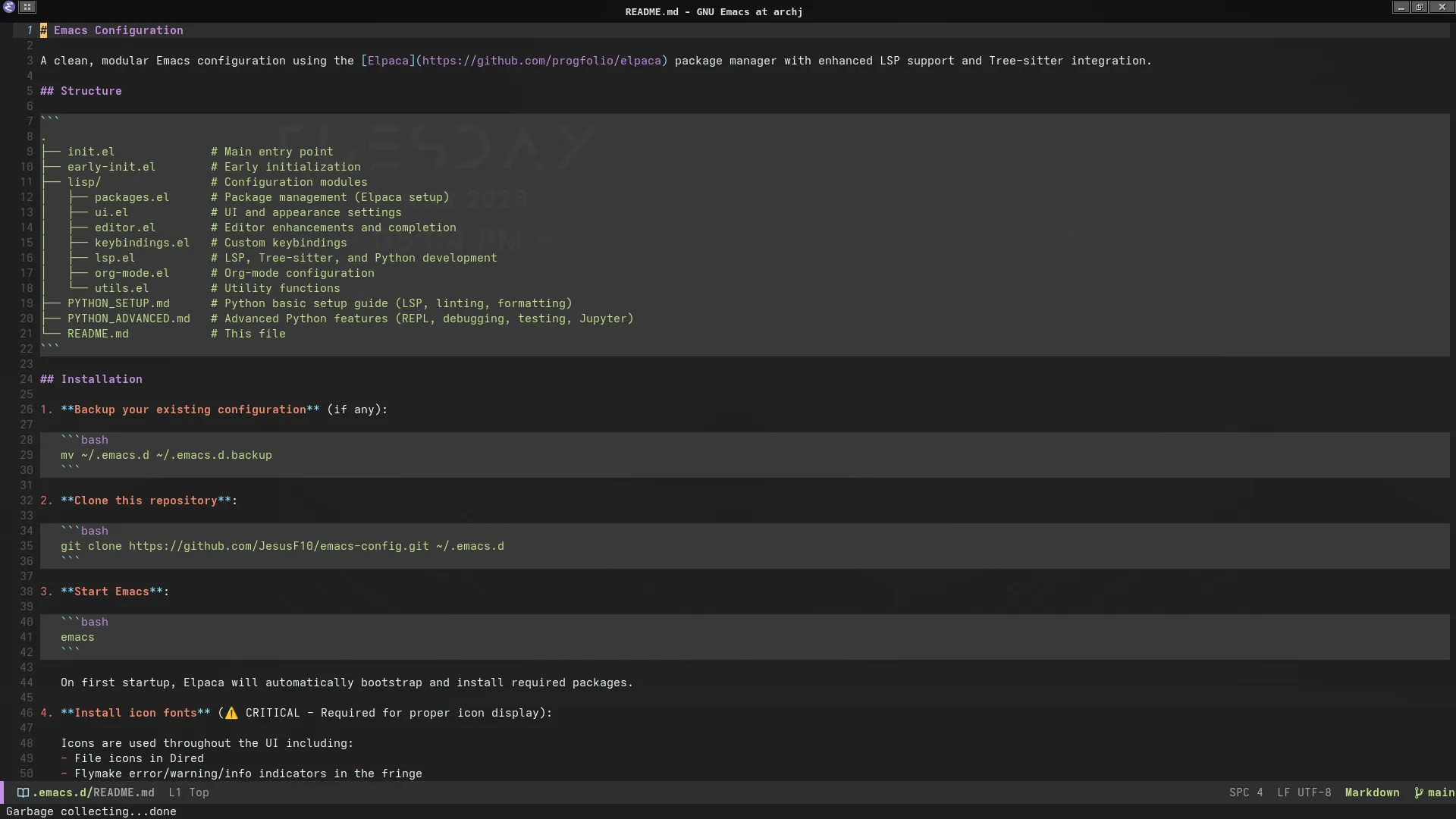
Tree-sitter powered Markdown with code block highlighting
Configuration Formats
;; TOML (pyproject.toml, uv.lock)
(use-package toml-ts-mode
  :mode "\\.toml\\'")

;; YAML (configs, data files)
(use-package yaml-ts-mode
  :mode "\\.ya?ml\\'")
Supported Languages
| Language | Mode | Use Case |
|---|---|---|
| Python | python-ts-mode | Primary development |
| CSV | csv-mode | Data inspection |
| Markdown | markdown-mode | Documentation, notebooks |
| TOML | toml-ts-mode | Configuration (pyproject.toml) |
| YAML | yaml-ts-mode | Config files, data |
| JSON | json-ts-mode | API responses, config |
| Shell | bash-ts-mode | Scripts, automation |
| Dockerfile | dockerfile-ts-mode | Container definitions |
Layer 3: Python Tooling
Rust-based tools provide 10-100x performance improvements over traditional Python tooling.
uv: Package & Environment Manager
Replaces pip + virtualenv with a single fast tool (10-100x faster than pip):
# Create environment (2s vs 8s with virtualenv)
uv venv

# Install packages (10-100x faster than pip — see https://docs.astral.sh/uv/)
uv pip install pandas numpy scikit-learn

# Add package to project
uv add requests

# Lock dependencies (like poetry lock)
uv lock

# Sync exact versions
uv sync
Integration:
(defun my/uv-install (package)
  "Install PACKAGE using uv in current .venv."
  (interactive "sPackage name: ")
  (let ((default-directory (project-root (project-current t))))
    (if (file-exists-p ".venv/bin/python")
        (async-shell-command (format "source .venv/bin/activate && uv pip install %s" package))
      (error "No .venv found. Run: uv venv"))))
Ty: LSP Server & Type Checker
Rust-native type checking with LSP support:
# pyproject.toml configuration
[tool.ty]
strict = true
ignore-missing-imports = ["sklearn", "tensorflow", "torch"]
python-version = "3.11"
Eglot Integration:
(with-eval-after-load 'eglot
  ;; Prefer local .venv/bin/ty
  (add-to-list 'eglot-server-programs
               '(python-mode . ("ty" "lsp")))

  ;; Performance tuning
  (setq eglot-events-buffer-size 0  ; Disable logging
        eglot-sync-connect nil       ; Async connection
        eglot-autoshutdown t))       ; Cleanup unused servers
Capabilities:
- Hover documentation (type info, docstrings)
- Auto-completion (context-aware, 20ms response)
- Go-to-definition (C-c . d)
- Find references (C-c . g)
- Rename symbol (C-c . R)
- Code actions (import sorting, type ignores)
Ruff: Linter & Formatter
10-100x faster than Flake8 and Black, Ruff handles linting and formatting:
# pyproject.toml configuration
[tool.ruff]
line-length = 88
target-version = "py311"

[tool.ruff.lint]
select = ["E", "F", "I", "N", "W"]  # Error, pyflakes, isort, naming, warnings
ignore = ["E501"]  # Line too long (handled by formatter)

[tool.ruff.format]
quote-style = "double"
indent-style = "space"
Flymake Integration:
(defun my/ruff-flymake (report-fn &rest _args)
  "Flymake backend for Ruff linting."
  (let ((source (current-buffer)))
    (make-process
     :name "ruff-flymake"
     :command (list "ruff" "check" "--output-format" "json" "-")
     :buffer source
     :sentinel
     (lambda (proc _event)
       (when (eq 'exit (process-status proc))
         (with-current-buffer source
           (funcall report-fn (my/parse-ruff-output))))))))

;; Enable automatically
(add-hook 'python-ts-mode-hook
          (lambda ()
            (add-hook 'flymake-diagnostic-functions #'my/ruff-flymake nil t)
            (flymake-mode)))
Format on save:
(defun my/ruff-format-buffer ()
  "Format buffer with Ruff."
  (when (derived-mode-p 'python-base-mode)
    (let ((local-ruff (expand-file-name ".venv/bin/ruff" (project-root (project-current)))))
      (if (file-exists-p local-ruff)
          (call-process-region (point-min) (point-max) local-ruff t t nil "format" "-")
        (message "⚠ Local ruff not found. Install: uv pip install ruff")))))

(add-hook 'python-ts-mode-hook
          (lambda ()
            (add-hook 'before-save-hook #'my/ruff-format-buffer nil t)))
Layer 4: LSP Client
Eglot provides native LSP support with minimal configuration.
Automatic .venv Detection
(defun my/eglot-ensure-with-venv ()
  "Start Eglot with project-local tools if available."
  (when (derived-mode-p 'python-base-mode)
    (let* ((project-root (project-root (project-current)))
           (local-ty (expand-file-name ".venv/bin/ty" project-root))
           (local-python (expand-file-name ".venv/bin/python" project-root)))

      ;; Configure LSP server
      (if (file-exists-p local-ty)
          (setq-local eglot-server-programs
                      `((python-mode . (,local-ty "lsp"))))
        (message "⚠ Local ty not found. Install: uv pip install ty"))

      ;; Configure Python interpreter
      (when (file-exists-p local-python)
        (setq-local python-shell-interpreter local-python))

      ;; Start LSP
      (eglot-ensure))))

(add-hook 'python-ts-mode-hook #'my/eglot-ensure-with-venv)
Performance Optimization
;; Reduce unnecessary requests
(setq eglot-send-changes-idle-time 0.5)  ; Debounce edits

;; Disable features not used
(setq eglot-ignored-server-capabilities
      '(:documentHighlightProvider      ; Don't highlight symbols
        :documentOnTypeFormattingProvider)) ; Don't format while typing

;; Increase responsiveness
(setq eldoc-idle-delay 0.2)  ; Show docs quickly
Configuration Structure
File Organization
~/.emacs.d/
├── init.el              # Entry point, package setup
├── early-init.el        # Pre-GUI optimizations
└── lisp/
    ├── editor.el        # Layer 1: Dired, Vertico, windows
    ├── lsp.el           # Layer 4: Eglot, Python Commander
    ├── languages.el     # Layer 2: Tree-sitter modes
    └── python-tools.el  # Layer 3: uv, Ty, Ruff integration
Loading Order
;; init.el
(add-to-list 'load-path (expand-file-name "lisp" user-emacs-directory))

(require 'editor)        ; Load editor layer first
(require 'languages)     ; Then language support
(require 'python-tools)  ; Then Python tooling
(require 'lsp)           ; Finally LSP integration
Design Decisions
Decision 1: Built-in Over External
Question: Why Eglot instead of lsp-mode?
Answer:
- Performance: Eglot is lightweight — built-in with minimal dependencies
- Simplicity: Zero configuration for most languages
- Maintenance: Built-in to Emacs 29+, always compatible
- Features: 90% of lsp-mode capabilities with 10% of complexity
Decision 2: Per-Project Tools
Question: Why not install ty/ruff globally?
Answer:
- Isolation: Project A can use ruff 0.4, Project B uses ruff 0.6
- Reproducibility:
uv syncrestores exact environment - Portability: Other developers get same tool versions
- Safety: No system-wide conflicts or version mismatches
Trade-off: Requires setup per project, mitigated by automation:
(defun my/init-python-project ()
  "Initialize new Python project with uv."
  (interactive)
  (let ((default-directory (read-directory-name "Project root: ")))
    (shell-command "uv venv && source .venv/bin/activate && uv pip install ty ruff ipython")
    (message "✓ Project initialized. Open Python file to start LSP.")))
Decision 3: Tree-sitter Native Modes
Question: Why Tree-sitter over regex-based modes?
Answer:
- Accuracy: Understands syntax structure, not just patterns
- Performance: Incremental parsing (~10ms per edit)
- Features: Enables structural navigation, better folding
- Future: Will be default in Emacs 30+
Requirement: Emacs 29+ compiled with --with-tree-sitter